Features
Everything below is in the app's menu bar: Room, Share, View, People and Help.
Sharing
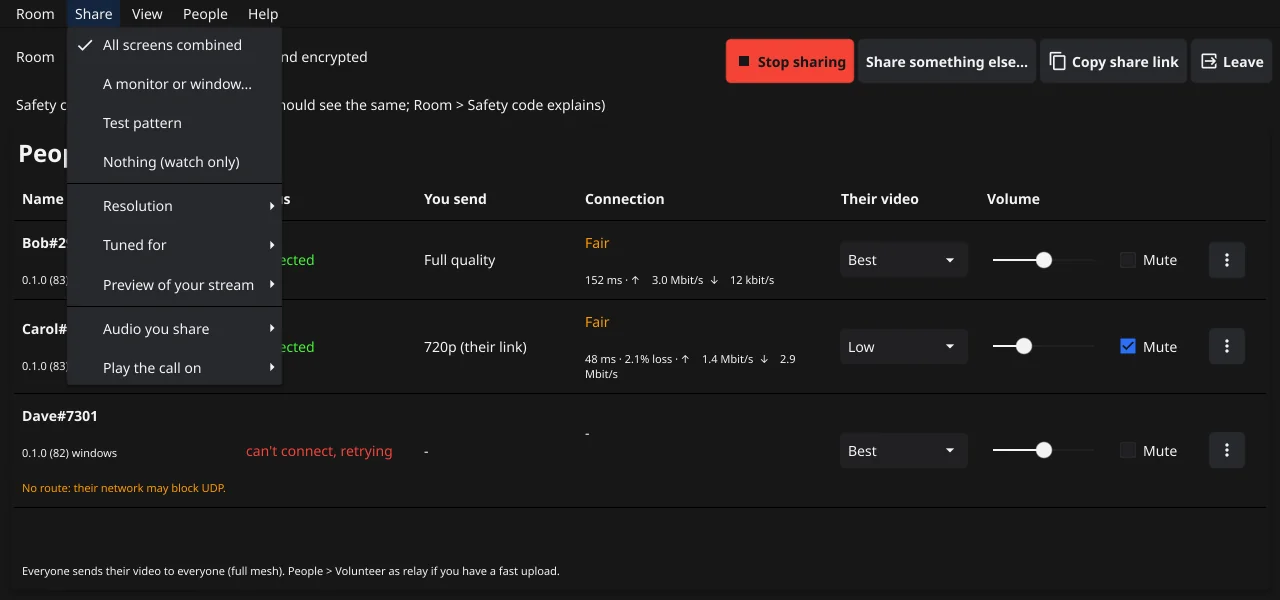
- What you share. Go live shares your main monitor. The Share menu also offers All screens combined, A monitor or window... (pick one monitor or one app window), a Test pattern, and Nothing (watch only). You can switch at any time without leaving the call.
- Resolution: 720p, 1080p or 4K. Higher needs more upload and CPU on your side and theirs. If your computer can't encode fast enough, Bellion Share steps the resolution down and tells you.
- Tuned for: Desktop (sharp text, 30 fps) or Game (smooth motion, 60 fps).
- Preview of your stream: off, a small floating window, or a corner of the video window, so you see what others get.
- Audio you share: no audio, all apps (everything you hear except Bellion Share itself, so the call never echoes back), or only the apps you pick. This uses PipeWire on Linux and per-app loopback capture on Windows.
- Play the call on: the speakers or headset other people's audio plays on.
- Hardware encoding. Bellion Share encodes H.264 on your graphics hardware when it can (NVIDIA NVENC, Intel Quick Sync, AMD AMF, VA-API on Linux, Media Foundation on Windows), and with x264 on the CPU otherwise.
Watching
- Layout (View menu): a separate window for each person, or everyone in one window. Arrange the window... sets the grid automatically or to your own rows and columns. If you close a window, View or People brings it back.
- Per person (in the People table or the People menu): their video at Best, Low or Off (audio only), their volume (up to 200%), and mute.
- Adapts to each viewer. Every sharer sends a high and a low layer, plus in-between sizes (1080p, 720p) for viewers whose connection or computer can't take the top size. Each person's row shows what you get from them, for example you get 720p.
- Smooth over loss. When packets get lost, Bellion Share holds the last good picture until the next full frame instead of showing a smeared one.
Rooms and people
- Sessions are a room code plus an optional password, shared as one link. Links open the app directly; older
blite://links still work. - No fixed room size. By default everyone sends their video directly to everyone (a full mesh), which strains most home uploads beyond about 5 people; Bellion Share warns you then. Relays let rooms grow past that.
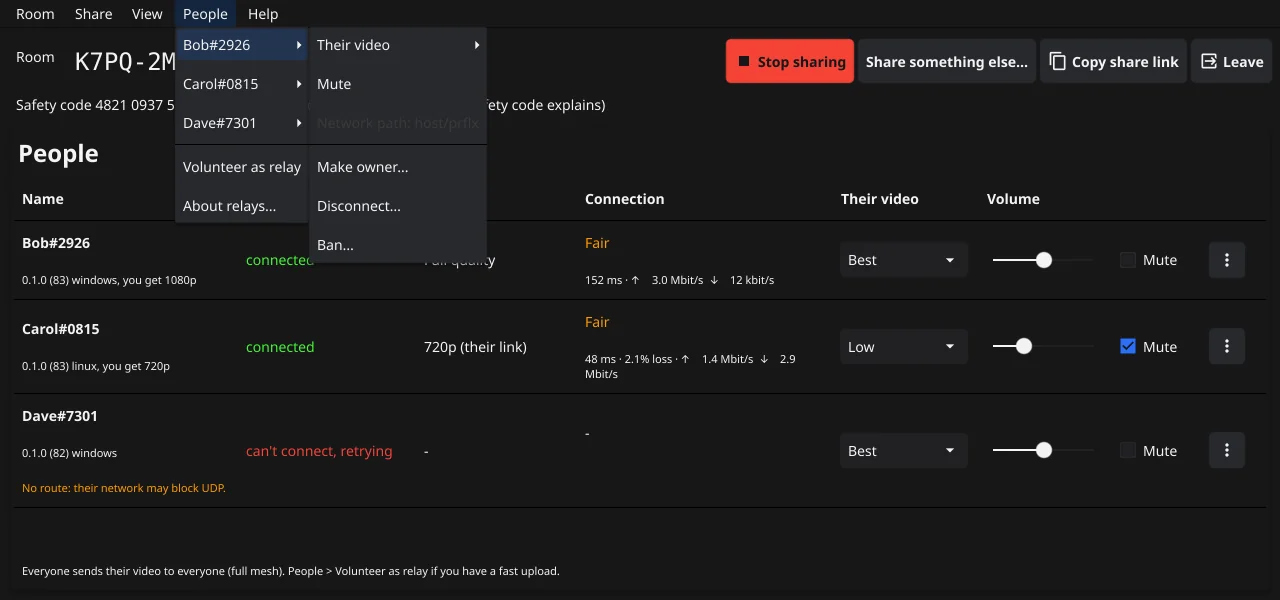
- Room owner. Whoever starts the session owns it (if the owner leaves, the person who joined earliest takes over). The owner can hand ownership to someone else, disconnect people (they can rejoin with the link) or ban them from the room.
- The People table shows each person's status, what you send them, and the connection: Good, Fair or Poor with the round-trip time, packet loss and data rates, plus a hint when something is wrong.
Privacy and security
- Peer to peer. Your screen goes straight to the people in your session, not through a streaming service. The server only introduces people to each other. When a direct path is blocked, a TURN server forwards the encrypted traffic.
- End-to-end encryption is on by default: each sender encrypts its media with keys only room members get.
- Identity keys and tags. Each person has an identity key; names show with a 4-digit tag derived from it (like Alice#4417). If someone shows up with a familiar name but a new key, Bellion Share points it out. Bellion Share refuses to connect to someone whose encryption keys don't match their identity.
- Safety code. Everyone in a call sees a safety code. Read it aloud once: if everyone sees the same numbers, nobody is intercepting the connection.
- The password stays in the part of the link after
#, which browsers never send to the server, so it stays out of the join page and its logs. The app does send it to our server, over an encrypted connection, to check it when you join. The server keeps only a hash of it, in memory, while the session lasts. - What a password does and doesn't protect. The password decides who the server lets in. It isn't part of the encryption keys, so a compromised server could add someone to your session without it. That person shows up in the People list and changes the safety code, so check both if it matters. Relays in your session also get the room's keys, like any member.
See the Privacy Policy for what the app and our server handle.
The app
- Runs in the tray; closing the window keeps it running. Optionally starts at sign-in.
- Updates itself: new versions are signed, offered in the app, and rolled back automatically if something goes wrong.
- Opens a UDP port (30471) on your router with UPnP, NAT-PMP or PCP by default, when the router allows it, so others can reach you directly. To turn this off, start the app with
-udp-port 0. - Like any peer-to-peer app, people in your session learn your IP address, and you learn theirs. Clicking a share link joins that session right away, so only click links from people you trust.
- Help > Send feedback... sends an idea or a problem report, optionally with diagnostics (your setup and call stats, no names, keys or links). Help > Logs and problem reports sends your logs, opens the log folder or copies diagnostics.
- On Windows, a crash guard runs Bellion Share and keeps crash dumps on your computer. They are never uploaded, but today they hold the app's full memory, which can include session keys. An upcoming version makes them much smaller and keeps fewer. You can delete them any time from
%LOCALAPPDATA%\Blite\crash. - Builds. The downloads on bellion.app are built by us, not by a public build service, so nothing proves they match a commit. If you want that certainty, build Bellion Share yourself from the source code.
Platforms
Windows 10 and 11 (64-bit), and Linux on X11 (Ubuntu 24.04, Mint 22 or newer for the .deb package). Wayland sessions aren't supported yet. The signaling server runs anywhere Go does: see Self-hosting.